
How camera technology function with light?

Here’s how camera technology functions with light — from the physics of light itself to how each camera component manipulates it:

1. The nature of light (what the camera is capturing)Light is electromagnetic radiation that travels as waves and also behaves as particles called photons. Key properties that matter to cameras:· Intensity (brightness) — how many photons arrive → determines exposure· Wavelength — determines color (≈400nm violet → ≈700nm red)· Direction — where rays come from → determines focus and perspective· Polarization — the orientation of light waves → used in some filtersA camera’s whole job is to measure intensity, organize direction, and separate wavelength — then record that information.

2. The lens: bending light by refraction· Light refracts (bends) when passing between materials of different density (air → glass).· A convex lens bends incoming rays so they converge to a focal point.· Focal length (e.g., 50mm) determines how strongly light bends: · Short focal length → wide view · Long focal length → zoomed-in view· Multiple lens elements correct distortions like chromatic aberration (different colors focusing at different points).

3. Aperture: controlling light quantity· The aperture is an adjustable iris. Its size is measured in f-stops (f/1.8, f/8, etc.).· Lower f-number = bigger opening = more light (and shallower depth of field).· Higher f-number = smaller opening = less light (and deeper depth of field).· Each full f-stop halves or doubles the light reaching the sensor.

4. Shutter: controlling light duration· The shutter is a timed gate. Shutter speed = how long light is allowed in.· 1/1000s → very little light, freezes motion· 1/30s → more light, may blur motion· Like aperture, each step doubles or halves light exposure.Aperture + shutter speed together = the exposure (total light energy hitting the sensor).

5. ISO: amplifying the light signal· ISO doesn’t change how much light enters — it amplifies the sensor’s signal.· Low ISO (100) → clean image, needs more light· High ISO (6400) → works in dim light, but adds noise· Think of it as the gain knob on the light signal.The exposure triangle: Aperture × Shutter × ISO — adjusting one affects the others.

6. The sensor: converting photons to electronsThis is where light becomes data:· Each photosite (pixel) is a tiny photodiode made of silicon.· When a photon hits silicon, it knocks loose an electron (photoelectric effect).· More photons → more electrons → stronger signal.· The charge is accumulated during exposure, then read out as a voltage.· An ADC converts that voltage into a digital number (e.g., 0–4095 for 12-bit).Color separation:· Silicon only detects brightness, not color.· A Bayer filter (red/green/blue mosaic) sits over the sensor, so each pixel sees only one color.· The processor interpolates (demosaics) to reconstruct full color per pixel.

7. How the camera handles different light levels· Bright light: fast shutter, small aperture, low ISO· Low light: slow shutter, wide aperture, high ISO (or add light/flash)· High contrast: sensor’s dynamic range limits how much bright-to-dark it can capture at once — HDR modes combine multiple exposures.

8. Autofocus & metering (light-based decisions)· Autofocus: uses phase detection or contrast detection to find where light rays converge sharpest.· Metering: measures light intensity across the scene to pick exposure settings.· White balance: measures color temperature of light (warm tungsten vs cool daylight) and corrects it.The core idea in one line:A camera is a light-measuring machine: the lens bends light, aperture and shutter control how much and how long, the sensor converts photons into electrons, and the processor turns those electrons into an image — all while ISO, autofocus, and metering manage the light signal at every step.

Explore more deeper into any piece — like sensor physics, dynamic range, or how low-light performance works?
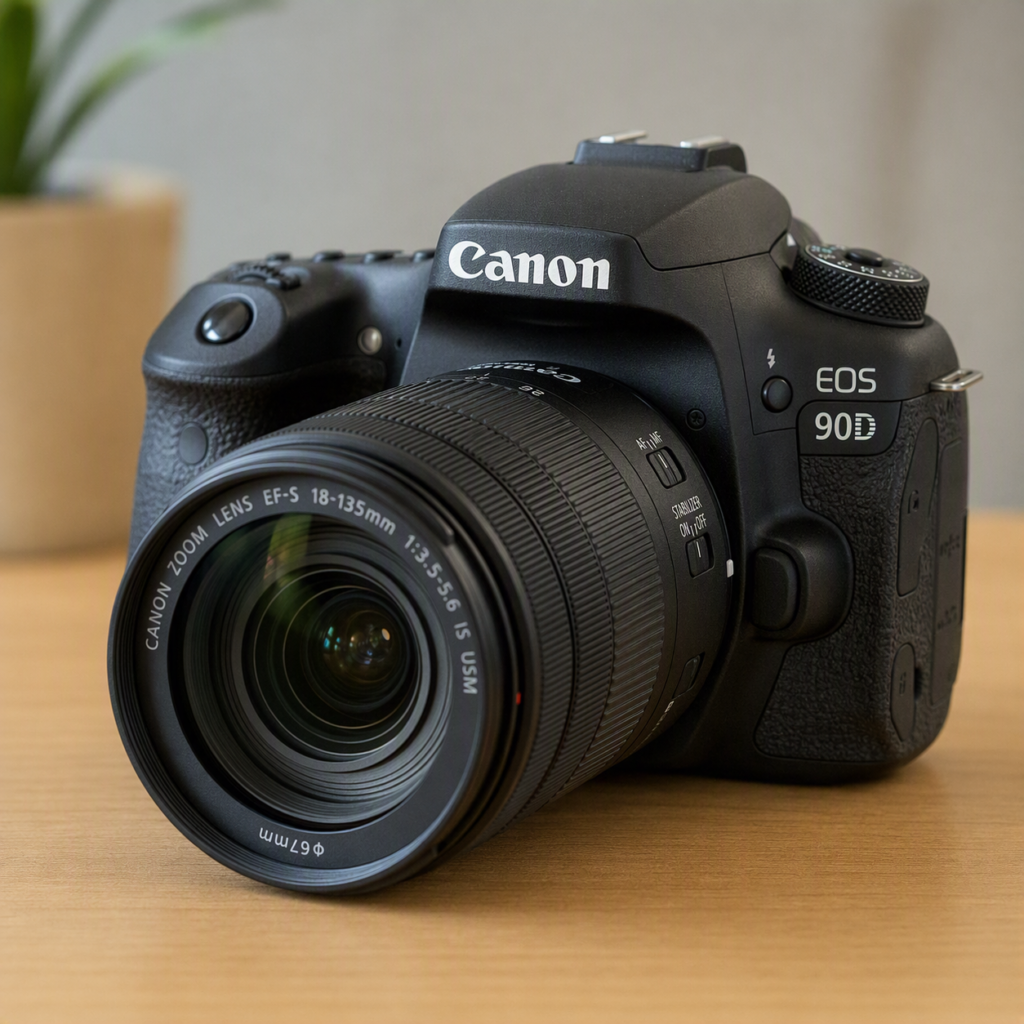
how does camera captures photo?

Here’s how a camera actually captures a photo, step by

Step:1. You press the shutter buttonThis triggers a sequence of events. In a digital camera, it’s all electronic; in a film camera, it’s mechanical.

2. The shutter opensThe shutter is like a curtain in front of the sensor/film. It opens for a precise amount of time (the shutter speed) — maybe 1/1000th of a second in bright light, or several seconds in the dark.

3. Light passes through the lensLight from the scene enters through the lens, which bends (refracts) the rays so they converge into a sharp image. The aperture (a hole inside the lens) controls how much light gets through.

4. Light hits the sensor (digital) or film (analog)Digital sensor:· The sensor is a grid of millions of tiny light-sensitive spots called photosites (or pixels).· Each photosite converts incoming photons into electrons — more light = more electrons. Most sensors have a Bayer filter on top: a mosaic of red, green, and blue filters, so each photosite only records one color. Green is most common because human eyes are most sensitive to green.· The sensor also has microlenses on each pixel to gather light more efficiently.Film:· Light hits silver halide crystals on the film, causing a chemical change.· This creates a “latent image” that becomes visible after developing.

5. The sensor reads out the signalOnce the shutter closes, the camera:· Measures the charge (electrons) at each photosite.· Converts that analog charge into a digital number using an analog-to-digital converter (ADC).· The result: raw pixel values (brightness per color channel).

6. Image processingThe camera’s processor turns raw data into a viewable image:· Demosaicing — fills in missing colors by interpolating from neighboring pixels (since each pixel only saw one color).· White balance — corrects color casts so whites look white.· Noise reduction — smooths out random sensor noise.· Sharpening & tone mapping — adjusts contrast, brightness, and sharpness.· Compression — saves as JPEG (lossy, smaller) or RAW/TIFF (uncompressed, more editing flexibility).

7. Saved to memoryThe final image is written to a memory card (SD, CFexpress, etc.) as a file.The whole chain in one line:Light → lens focuses it → aperture & shutter control it → sensor converts photons to electrons → ADC turns electrons into numbers → processor turns numbers into an image → saved to memory.Want me to go deeper on any part — like how autofocus works, how ISO fits in, or how RAW vs JPEG differs?

how does games software work?

Game software works by creating a real-time interactive simulation that responds to player input, renders graphics, plays audio, and manages game state—all within milliseconds. Here’s the complete system:

1. The Core Loop — The Heart of Every GameEvery game, from Pong to Cyberpunk 2077, runs on a continuous loop: while (game is running) { ProcessInput() // Read keyboard, mouse, controller Update() // Move objects, check collisions, run AI Render() // Draw everything to screen PlayAudio() // Play sounds and music} This loop runs 30–120 times per second (FPS). Everything else in game software exists to make this loop faster, smoother, and more capable.

2. The Game Engine — The Foundation A game engine is a collection of software systems that handle common tasks so developers don’t build from scratch:Engine Language Best For Notable GamesUnreal Engine C++ / Blueprints AAA, photorealistic Fortnite, Gears of WarUnity C# Indie, mobile, AR/VR Among Us, Pokémon GoGodot GDScript / C++ Open-source, 2D/3D Brotato, Cassette BeastsGameMaker GML 2D indie Undertale, Hotline MiamiCustom engines C++ Specific needs EA Frostbite, Rockstar RAGEWhat engines provide:· Rendering — draws 2D/3D graphics· Physics — simulates gravity, collisions· Audio — plays sound effects and music· Input — reads keyboard, mouse, controller· Networking — multiplayer support· Scripting — game logic· Asset pipeline — imports models, textures, sounds

3. Rendering — How Graphics AppearRendering is the most computationally expensive part: 3D Models → Transform → Lighting → Rasterize → Pixels on Screen Stage What HappensModel loading Load 3D meshes from diskTransformation Position objects in 3D spaceCamera Calculate view from player’s perspectiveLighting Calculate light on surfacesRasterization Convert 3D to 2D pixelsShading Apply textures, colors, effectsPost-processing Bloom, blur, color gradingOutput Send to monitorGPU role: The Graphics Processing Unit handles millions of calculations in parallel—essential for real-time rendering.

4. Physics — How Objects BehavePhysics engines simulate real-world motion:Physics System What It DoesRigid body Solid objects, collisionsSoft body Cloth, hair, deformable objectsFluid Water, smoke, fireParticle Sparks, dust, explosionsRagdoll Character death animationsVehicle Car, bike, plane physicsCollision detection: Every frame, the engine checks if objects overlap: if (objectA.bounds overlaps objectB.bounds) { resolveCollision(objectA, objectB)}

5. Game Logic — How the Game BehavesGame logic is the rules of the game:System What It ManagesState machine Menu, playing, paused, game overAI Enemy behavior, pathfindingQuest system Missions, objectivesInventory Items, weapons, upgradesScoring Points, levels, progressionDialogue NPC conversationsSave/load Persist player progressExample — Enemy AI: if (player is visible) { if (distance < attackRange) { attack() } else { moveToward(player) }} else { patrol()}

6. Audio — How Games SoundGame audio is layered and dynamic:Audio Type PurposeSound effects Footsteps, gunshots, UI clicksMusic Background, adaptiveAmbient Wind, crowd, environmentVoice Dialogue, narrationSpatial audio 3D positioned soundMiddleware: Tools like FMOD and Wwise handle complex audio mixing, effects, and adaptive music.

7. Input — How Players ControlInput systems read and translate player actions:Input Device How It WorksKeyboard Key press → actionMouse Position + click → aim/shootController Analog sticks, buttons, triggersTouch Tap, swipe, pinchMotion Gyroscope, accelerometerVR controllers 6DoF position + rotationVoice Microphone → commandsInput mapping: Games abstract input so the same action works on any device: “Jump” → Spacebar (PC) / A button (Xbox) / X button (PlayStation)

8. Networking — How Multiplayer WorksMultiplayer games synchronize state across players:Model How It Works ExamplePeer-to-peer Players connect directly Among UsClient-server Central server authoritative FortniteDedicated server Game company hosts World of WarcraftListen server One player hosts MinecraftKey challenges:· Latency — delay between players· Lag compensation — predicting where players are· Cheating prevention — server authority· State sync — keeping all players consistent9. Asset Pipeline — How Content Gets InGame assets are created in external tools and imported:Asset Type Created In Imported As3D models Blender, Maya, 3ds Max FBX, OBJ, GLTFTextures Photoshop, Substance PNG, TGA, DDSAudio Pro Tools, Audacity WAV, OGG, MP3Animation Blender, MotionBuilder FBX, BVHLevels Unity, Unreal Editor Scene filesScripts IDE (VS Code, Rider) C#, C++, GDScript10. The Full Game Software Stack“`┌─────────────────────────────────────┐│ GAME CODE │ ← Game logic, AI, quests├─────────────────────────────────────┤│ GAME ENGINE │ ← Rendering, physics, audio├─────────────────────────────────────┤│ MIDDLEWARE / PLUGINS │ ← FMOD, PhysX, Havok├─────────────────────────────────────┤│ PLATFORM SDK / APIs │ ← DirectX, Vulkan, Metal├─────────────────────────────────────┤│ OPERATING SYSTEM │ ← Windows, Android, iOS├─────────────────────────────────────┤│ HARDWARE │ ← CPU, GPU, RAM, Storage└─────────────────────────────────────┘“`

11. Real-Time Performance — Why It’s HardGames must run in real-time—unlike movies, which are pre-rendered:Challenge Target WhyFrame rate 60–120 FPS Smooth motionFrame time 8–16ms No stutterLatency <20ms Responsive inputMemory Limited Fit in RAM/VRAMThermals Cool No throttlingEvery millisecond counts. A game that takes 20ms per frame runs at 50 FPS—noticeably laggy.

12. Game Software CategoriesType How It Works ExamplesSingle-player Local, no network Zelda, Elden RingMultiplayer Networked Call of Duty, FortniteMMO Massive, persistent World of WarcraftMobile Touch, casual Candy Crush, PUBG MobileVR Immersive, 6DoF Half-Life: AlyxAR Real world + digital Pokémon GoCloud Streamed from server Xbox Cloud GamingBrowser Runs in browser Slither.io

13. The Development Pipeline“`Idea → Design → Prototype → Production → Testing → Release → Live Ops Stage What HappensDesign Game design document, mechanicsPrototype Playable demo, core loopProduction Art, code, audio, levelsTesting QA, bug fixing, balanceRelease Launch on platformsLive Ops Updates, DLC, events

14. Key Programming ConceptsConcept What It DoesGame loop Runs the gameEntity-component system Organizes game objectsState machine Manages game statesPathfinding AI navigation (A*) Collision detection Object interactionObject pooling Reuse objects for performanceLOD Level of detail for distant objectsCulling Don’t render what’s not seenBatching Draw similar objects together

15. The Future of Game SoftwareTrend What It MeansAI-generated content Procedural worlds, NPCsCloud gaming No local hardwareRay tracing Realistic lighting Machine learning Smarter AI, upscalingMetaverse Persistent shared worldsNeural rendering AI-generated framesQuantum computing Physics simulations🔑 The Core IdeaGame software works by:

1. Looping — input → update → render → repeat

2. Simulating — physics, AI, game rules

3. Rendering — drawing 2D/3D graphics

4. Sounding — playing audio

5. Networking — syncing multiplayer

6. Managing — assets, memory, performance

7. Responding — in real-time, every frameA game is a real-time simulation that responds to you.It’s not just software—it’s a living system that thinks, reacts, and evolves 60 times per second.

Explore deeper into any part—like how game engines render 3D graphics, how multiplayer networking works, or how AI in games makes decisions?

How does light pattern work?

Light patterns in product photography are about shaping light to reveal texture, form, and detail while controlling reflections and shadows. Here’s how they work:

1. The Core Principle: Light Has Direction, Size, and IntensityEvery light pattern is defined by three variables:Variable What It Controls EffectDirection Where light comes from Shadows, highlightsSize How large the source is Soft vs. hard shadows Intensity How bright it is Contrast, moodThe bigger the light source, the softer the shadows. The closer the light, the softer it becomes.

2. The Five Key Light PatternsPattern

1: Flat Lighting (Even)“`Light → Product → Camera“`· Light directly behind camera· Effect: No shadows, even exposure· Best for: E-commerce, catalog, documents· Limitation: Flat, no depthPattern 2: Side Lighting (Texture)“`Light → Product ↓ Camera“`· Light from 90° side· Effect: Reveals texture, surface detail· Best for: Wood, fabric, leather, food· Limitation: Deep shadows on opposite sidePattern

3: Rembrandt Lighting (Form)“`Light → Product ↓ (45°) Camera“`· Light at 45° above and to side· Effect: Triangle of light on shadow side· Best for: Portraits, sculptural products· Limitation: Requires fill lightPattern

4: Backlighting (Silhouette/Edge) Light → Behind Product → Camera Light behind product· Effect: Glowing edges, silhouette· Best for: Glass, transparent items, drama· Limitation: Product face underexposedPattern

5: Top Lighting (Even + Shadow)“`Light → Above Product ↓ Camera“`· Light directly above· Effect: Even top, shadow below· Best for: Flat-lay, food, cosmetics· Limitation: Harsh shadows underneath3. How Light Size Changes EverythingLight Size Shadow Type Best ForSmall (bare bulb) Hard, sharp Drama, textureMedium (softbox) Soft, gradual General productLarge (scrim) Very soft, even Jewelry, reflectiveGiant (wall bounce) Shadowless High-key, cleanThe rule: The larger the light relative to the product, the softer the shadow.

4. How Light Position Changes the Look“` Top |Left —-+—- Right | Bottom“`Position Effect UseFront Flat, even Catalog 45° side Depth, form Most products90° side Texture, drama Wood, fabricBack Edge, glow Glass, transparentTop Even, shadow below Flat-layBottom Unusual, eerie Creative

5. How Light Modifiers Shape the PatternModifier What It Does PatternSoftbox Large, soft source Even, gradualBeauty dish Focused, soft Center bright, edge falloffUmbrella Broad, even Wraps around productSnoot Narrow beam SpotlightBarn doors Cuts light Controlled spillGrid Directional Tight beamScrim Diffuses Soft, evenReflector Bounces Fill shadows

6. How Reflections Work on ProductsReflective products (glass, metal, glossy plastic) don’t show light patterns — they show reflections of the light source: Light source → Reflection on product → Camera The rule: For reflective products, you light the reflection, not the product.Product Lighting StrategyGlass Backlight + white backgroundMetal Large white card + dark edgesGlossy plastic Tent + gradient reflectionJewelry Light tent + pinpoint highlights

7. How Shadows Create DepthShadows are not the enemy — they define shape:Shadow Type Effect UseHard shadow Strong form, drama Art, moodSoft shadow Subtle depth CommercialNo shadow Flat, clean E-commerce Gradient shadow Natural, 3D Most productsKey: Shadows tell the brain where the product ends and the background begins.

8. The Three-Light Setup (Classic Pattern) Key light (main) ↓Fill light (shadows) → Product → Camera ↓Back light (separation) Light Role Position Key Main illumination 45° sideFill Soften shadows Opposite sideBack Separate from background BehindResult: Controlled, professional, repeatable.

9. The One-Light Setup (Minimal Pattern)“`Light → Diffuser → Product → Camera ↓ Reflector“`· One light + diffuser· White foam board as reflector· Best for: Beginners, small products· Result: Natural, soft, simple

10. How Light Patterns Affect ColorPattern Color EffectWarm light Cozy, invitingCool light Clean, clinicalNeutral (5500K) Accurate, trueMixed Creative, moodyFor product accuracy: Use 5500K daylight-balanced light.

11. How Light Patterns Affect TextureTexture Best PatternSmooth Large soft lightRough Side light (raking)Glossy Tent + reflection controlMatte 45° soft lightTransparent Backlight + edge lightMetallic Gradient reflection

12. The Full Light Pattern Pipeline“`Light source ↓Modifier (softbox, umbrella, snoot) ↓Direction (front, side, back, top) ↓Size (small, medium, large) ↓Intensity (bright, dim) ↓Reflection control (tent, card, flag) ↓Shadow control (fill, reflector) ↓Product receives light ↓Camera captures pattern ↓Image shows form, texture, detail

13. Real-World ExamplesProduct Light PatternWatch Large softbox above + reflectors Bottle Backlight + side gradientShoes 45° key + fill + backJewelry Light tent + pinpointFood Side + back + fillElectronics Large scrim + gradientCosmetics Top + front + reflectorFurniture Large softbox + fill

14. Common MistakesMistake Result FixLight too small Harsh shadows Use larger modifierLight too close Hot spots Move back, diffuseNo fill Deep shadows Add reflectorWrong direction Flat or harsh Move to 45°Ignoring reflection Ugly highlights Use tent or card🔑 The Core IdeaLight patterns work by controlling four things:

1. Direction — where light comes from

2. Size — how soft or hard the shadow

3. Intensity — how bright or dim

4. Reflection — how light bounces off the productThe pattern is the shape of light on the product.It’s not about more light — it’s about the right light in the right place to reveal form, texture, and detail while controlling shadows and reflections.

Explore deeper into any specific pattern — like how to light glass, how to use a light tent, or how to create gradient reflections on metal?

what is best lens for product photography?

There isn’t one “best” lens for product photography, as the ideal choice depends on the size of your products, your available shooting space, and your budget.

However, most professional product photographers agree that a 90mm to 105mm macro lens is the strongest all-around choice for a full-frame camera .

For a crop-sensor (APS-C) camera, a 60mm to 70mm macro achieves a similar practical result .📷 Why a 90-105mm Macro Lens?· True Macro (1:1): Captures intricate details of small items (jewelry, watches, cosmetics) at life-size.

Comfortable Working Distance: The longer focal length gives you room between the lens and product to position lights and reflectors without casting shadows .

Minimal Distortion: Ensures the product’s shape and proportions look natural and accurate, which is crucial for catalog and e-commerce shots.

Excellent Sharpness: Delivers edge-to-edge clarity, so every detail is crisp .📸 Other Options to Consider· 50mm Lens (Budget-Friendly): Great for medium-to-large products (shoes, candles, packaged goods) or small studios. The 50mm mimics human vision, offering a natural perspective .

Tilt-Shift Lens (Advanced/Studio): Offers ultimate control over perspective and the plane of focus. Ideal for preventing distortion in bottles or furniture and for managing reflections. Versatile Zoom (e.g., 24-70mm): A flexible option for mixed product sizes. It covers wide lifestyle shots to tighter details without changing lenses, though it lacks true macro magnification .💡

Tips for Choosing· Match to Product Size: Small items demand a macro lens. Larger items work well with a 50mm prime or a zoom . Consider Your Space: If you have limited room, a shorter focal length like 50mm or 85mm may be more practical than a longer 100mm macro . Lighting is Key: Since you’ll likely be shooting at narrow apertures (f/8 to f/11) for deep depth of field, a wide aperture isn’t the most critical factor. A solid tripod and good lighting often have a bigger impact on quality than lens speed .

Search more topics on Google.com

What are the key APIs and SDKs for building AR — ARKit, ARCore, OpenXR, WebXR?

The key APIs and SDKs for building AR each serve a distinct purpose, from platform-specific development to cross-platform standards and web-based accessibility.🍎

ARKit (Apple) ARKit is Apple’s native framework for building AR experiences on iOS, iPadOS, and visionOS . It provides the essential building blocks like motion tracking (6DoF), scene understanding (plane detection, image/object tracking), and people occlusion.

You typically pair ARKit with RealityKit for high-performance 3D rendering or SceneKit for simpler scenes .🤖

ARCore (Google)ARCore is Google’s cross-platform SDK for Android and iOS . Its core capabilities mirror ARKit: motion tracking, environmental understanding (detecting horizontal/vertical surfaces), and light estimation . A standout feature is Geospatial API, which uses Google’s Street View data for precise outdoor location anchoring, and Cloud Anchors for persistent, shared AR experiences .🌐

OpenXR (Khronos Group) OpenXR is not a specific AR SDK but an open, royalty-free standard for accessing VR/AR devices and runtimes .

Its goal is to let developers write code once and run it across many headsets (like Meta Quest, HoloLens, and SteamVR) without rewriting for each platform . It abstracts device features like display, tracking, input, and haptics into a unified API .🕸️

WebXR (W3C) WebXR is a web standard that brings AR/VR to browsers .

It lets you access immersive devices directly from a web page without installing an app.

On Android, it uses ARCore behind the scenes; on visionOS, it uses Apple’s ARKit . It’s ideal for accessible, link-shareable AR but currently supports fewer advanced features (like plane detection) compared to native SDKs .💡

How to Choose· ARKit for deep, native integration on Apple devices.· ARCore for broad reach across Android and iOS.· OpenXR when you need your app to run on many different headsets.· WebXR for instant, browser-based experiences.

Find and explore a specific use case, like building for headsets or web-based AR?

How does ar works and get shapes in real world? What is the reality in it and it’s features and function and system and software and products related to it?

Augmented Reality (AR) works by blending virtual objects with the real world in real-time, creating an illusion that digital content exists in your physical space.

The technology relies on a system that continuously tracks the environment and your position to anchor virtual shapes to real-world coordinates.🧠

How AR Places Virtual Shapes in Reality

The core challenge is making a virtual object appear “fixed” to a real-world location. Here is the technical pipeline that makes this possible:·

Sensing the Environment: The system uses cameras and sensors (like LiDAR) to capture depth data and images of the surroundings .

This data builds a 3D “point cloud” or mesh of your room, detecting surfaces like tables and walls .· Simultaneous Localization and Mapping (SLAM): As the device moves, SLAM algorithms perform two tasks simultaneously: they build a map of the environment and calculate the device’s precise position (pose) within that map .

This creates a consistent coordinate system for virtual objects .·

6 Degrees of Freedom (6DoF) Tracking: Systems track your position and orientation with 6DoF (x, y, z position plus pitch, yaw, roll rotation) .

This allows virtual objects to stay anchored in place as you move around them.· Anchoring and Occlusion: Once a surface is mapped, virtual objects are anchored to it. For true realism, occlusion is used: if a real object is between you and the virtual object, the system hides the virtual part using a depth map . This creates the illusion that the virtual object is truly behind the real one.🕶️ What is the “Reality” in AR?

The “reality” in AR is a blended, interactive experience where virtual elements are contextually aware of the physical world. It is not simply an overlay; the system understands the geometry of the space . This understanding enables features like:·

Spatial Audio: Sounds from virtual objects appear to come from their specific location.·

Physical Interaction: You can walk around a virtual object as if it were physically there.·

Contextual Information: AR can display information relevant to what you are looking at (e.g., a mechanic seeing a diagram overlaid on an aircraft part) .⚙️ Features, Functions, and the Software System

The software architecture that enables this is typically layered:· Data Layer: This includes a World Knowledge component, which is a digital representation of the real space used for localization and analysis . Interactive Contents are the virtual 3D models and their behaviors .·

Vision Engine: Processes camera input to detect features, planes, and objects, providing the positional data for the SLAM system .·

Rendering Engine: Uses a Graphical Processing Unit (GPU) to draw the virtual content. It calculates how the virtual object should look from your current perspective, handling lighting and shadows to make it look realistic .📱

Products and PlatformsThe industry is shifting toward lightweight glasses, with 84.6% of XR shipments being glasses in Q2 2026 .

Major platforms include:·

Meta: Offers the Ray-Ban Meta line (audio and camera glasses) and a new lightweight Meta VR Glasses (launching 2027) that offloads computing to a pocket puck . Google: Android XR platform provides Jetpack Compose Glimmer for building AR interfaces on AI glasses .

Apple: Vision Pro is a high-end mixed reality headset for immersive experiences. In summary, AR works by fusing sensor data to build a map, tracking your movement within it, and rendering virtual objects that are anchored to real-world surfaces with realistic occlusion.

EXPLORE MORE IN DEPTH LIKE

How someone’s would like you to explore the specific differences between AR, VR, and Mixed Reality (MR)?

how lens innovation shapes the future of ai?

Lens innovation is not just supporting AI—it is shaping its future by providing the eyes, the speed, and the sensory data that AI needs to become more capable, more efficient, and more integrated into daily life. Here’s how:

1. Lenses Give AI Its EyesAI is only as good as the data it receives. Lenses are the primary source of visual data:AI Application Lens Role ImpactComputer vision Camera lens Object detectionFacial recognition IR + RGB lens Identity verificationAutonomous vehicles LiDAR + camera NavigationMedical AI Microscope lens DiagnosisRobotics Depth lens ManipulationDrones Multispectral lens MappingSecurity Zoom lens SurveillanceWithout lenses, AI would be blind.

2. Lens Innovation Enables New AI CapabilitiesLens Innovation AI Capability UnlockedEvent-based cameras Ultra-low latency, low power AI Meta surfaces Flat, tiny, multi-function AI eyesComputational lenses AI-powered image reconstructionLight field lenses Depth-aware AI visionHyperspectral lenses Material-aware AIPolarization lenses Surface-aware AIQuantum lenses Entangled photon AINew lenses = new AI senses.

3. Lenses Make AI FasterAI processing is limited by data quality and speed. Lens innovation removes bottlenecks:Bottleneck Lens Solution AI Speed GainLow light Large aperture lens Faster detectionMotion blur Stabilized lens Clearer framesGlare AR coating Better contrastNarrow field Wide-angle lens More contextSlow focus Liquid lens Instant focusData overload Computational lens On-lens processingBetter lenses = faster AI decisions.

4. Lenses Make AI More EfficientEnergy is AI’s biggest constraint. Lens innovation reduces computation:Approach How It Helps AI Optical preprocessing Lens does work before AIAnalog computing Light does math, not chipsDiffractive lenses Passive neural networks Metasurfaces Multi-function, one layerComputational imaging Fewer pixels, same infoEvent cameras Only changes, not framesSmart lenses = less AI computation = less energy.

5. Lenses Enable Edge AIAI is moving from cloud to device. Lenses make this possible:Edge AI Device Lens Innovation BenefitSmartphone Multi-lens array Portrait, night modeSmart glasses Waveguide lens AR overlaySmart contact lens Micro-lens Health monitoringSecurity camera AI lens On-device detectionDrone Lightweight lens Real-time decisionsRobot Depth lens Safe navigationCar LiDAR lens Instant reactionSmall lenses = powerful edge AI.

6. Lenses Enable AI to See Beyond Human VisionAI can process what humans cannot see. Lenses unlock this:Lens Type AI Sees Application Infrared Heat Night vision, security Ultraviolet UV patterns Material analysis Hyperspectral Chemical signatures Agriculture, miningPolarization Surface stress Quality controlTerahertz Through walls Security scanningQuantum Entangled photons Secure communicationAI + advanced lenses = superhuman vision.

7. Lenses Enable AI to Understand 3D SpaceDepth perception is critical for AI:Lens Technology AI CapabilityStereo lenses Depth mappingLiDAR lens 3D point cloudsStructured light Precise 3D scanningTime-of-flight lens Real-time depthLight field lens Post-capture focusHolographic lens True 3D display3D lenses = AI that understands space.

8. Lenses Enable AI to Predict and AnticipatePredictive AI needs rich, real-time data:Lens Innovation AI PredictionEye-tracking lens Where you’ll look nextGaze prediction Intent anticipationMotion tracking Where things will moveEvent camera What will changeAR lens What you need to seeAdaptive lens What you need to focus onPredictive lenses = proactive AI.

9. Lenses Enable AI-Human IntegrationThe future is AI that works with humans, not just for them:Integration Lens RoleAR glasses Overlay AI info on worldSmart contacts Invisible AI interfaceRetinal implants Direct AI-to-brainBrain-computer interface Optical neural linkEye tracking Intent detectionGaze control Hands-free interactionLenses = the interface between AI and human.

10. Lenses Enable AI to Learn BetterTraining AI requires massive visual data:Lens Innovation AI Training BenefitHigh-res lenses More detailMulti-spectral More dimensions 3D lenses Spatial understandingEvent cameras Temporal dynamicsComputational lenses Synthetic dataSimulation lenses Virtual trainingBetter lenses = better training data = smarter AI.

11. Lenses Enable Optical AI ComputingThe future of AI may be light-based:Technology How It Works AI ImpactOptical neural networks Light does matrix math 1000× fasterDiffractive deep networks Layers of lenses Passive AIPhotonic chips Light-based processors Low powerHolographic memory Light stores data Massive capacityQuantum optics Entangled photons Exponential speedupLenses are the hardware of future AI.

12. Lens Innovation + AI = New IndustriesIndustry Lens + AI InnovationHealthcare AI diagnosis via lens imaging Automotive Self-driving via LiDAR + AIAgriculture Precision farming via drone lens + AIManufacturing Quality control via machine visionSecurity Facial recognition via IR lensRetail Customer tracking via camera lensEducation AR learning via waveguide lensEntertainment VR/AR via headset lensFinance Eye-tracking security Space Autonomous exploration

13. The Co-Evolution of Lenses and AI Lens innovation ↓Better visual data ↓Smarter AI ↓AI designs better lenses ↓Even better visual data ↓Even smarter AI ↓ They improve each other in a continuous loop.

14. Real-World ExamplesCompany/Product Lens + AI InnovationTesla Camera lenses + AI = self-drivingApple LiDAR lens + AI = AR appsGoogle Lens + AI = Google LensMeta Waveguide lens + AI = AR glassesXPANCEO Smart contact lens + AI = ARNVIDIA Lens + AI = autonomous machinesBoston Dynamics Depth lens + AI = robotsJohn Deere Camera lens + AI = precision farming

15. The Future of AI Is OpticalTrend Lens RoleEdge AI Small, efficient lenses AR/VR Immersive lenses Autonomous systems Reliable, multi-modal lensesBrain-computer interface Optical neural links Quantum AI Entangled photon lenses Optical computing Light-based processors Smart contacts Invisible AI interfaces

16. The Strategic Value of Lens Innovation for AIDimension ValueSensing AI gets better eyes Speed AI reacts faster Efficiency AI uses less power Capability AI sees beyond human Integration AI merges with life Intelligence AI learns betterFuture AI becomes optical🔑

The Core IdeaLens innovation shapes the future of AI by:

1. Giving AI eyes — visual data input

2. Making AI faster — removing bottlenecks

3. Making AI efficient — optical preprocessing

4. Enabling edge AI — small, powerful lenses

5. Extending AI vision — IR, UV, hyperspectral

6. Adding 3D understanding — depth, space

7. Enabling prediction — gaze, motion, intent

8. Integrating with humans — AR, smart contacts

9. Enabling optical computing — light-based AI

10. Creating new industries — healthcare, auto, agricultureThe future of AI is not just digital—it is optical. And lenses are the key.

Every lens innovation opens a new door for AI. Every AI advance demands a better lens.

They are co-evolving toward a future where AI sees the world as clearly as—or better than—humans do.

Explore deeper into any area—like optical neural networks, event-based cameras for AI, or how smart contact lenses will interface with AI?

what is the use of making lens in innovation?

Making a lens is not just manufacturing a product—it is creating a platform for innovation. The act of making a lens enables breakthroughs because it turns theory into a physical tool that can then be used to discover, measure, manipulate, and create. Here’s the deeper answer:

1. Making a Lens Turns Physics into a Tool

A lens is where optical theory becomes physical reality:Stage What Happens Innovation Enabled

Theory Snell’s Law, wave optics Understanding light Design Curvature, material, coating Planning the toolMaking Grinding, polishing, coating Physical lens existsApplication Microscope, camera, laser New discoveriesWithout making the lens, the theory stays on paper. Making it creates the tool that drives innovation.

2. Making Lenses Enables Scientific DiscoveryEvery major scientific advance needed a made lens:Discovery Lens Made InnovationCells Microscope lens Biology, medicineGalaxies Telescope lens Astronomy, cosmologyAtoms Electron lens Quantum physicsDNA X-ray lens Genetics, biotechViruses Electron microscope Virology, vaccinesExoplanets Space telescope lens Search for lifeMaking the lens made the discovery possible.

3. Making Lenses Drives Medical InnovationMedical Innovation Lens Made Life ImpactCataract surgery IOL Restored sight to millionsLASIK Laser + lens Vision correctionEndoscopy Fiber lens Minimally invasive surgeryOphthalmoscopy Fundus lens Retinal diagnosisGlucose sensing Smart contact lens Diabetes monitoringRetinal implant Micro-lens array Restored visionMaking lenses saves lives.

4. Making Lenses Enables Computing & AITechnology Lens Made InnovationComputer chips Lithography lens Digital revolutionOptical computing Photonic lens Faster processingAI vision Camera lens Neural networksLiDAR Laser lens Autonomous vehiclesAR/VR Waveguide lens Immersive computingEye tracking IR lens Human-computer interfaceMaking lenses makes AI possible.

5. Making Lenses Drives Manufacturing InnovationInnovation Lens Made ImpactLaser cutting Focus lens Precision manufacturingLaser welding Focus lens Stronger joints 3D printing UV lens Rapid prototypingSemiconductor EUV lens Nanometer chipsQuality control Machine vision lens Zero defectsRobotics Camera lens Automated factoriesMaking lenses makes other things better.

6. Making Lenses Enables Energy InnovationInnovation Lens Made Impact Solar power Concentrator lens More efficientFusion Laser lens Clean energyLED lighting Distribution lens Better lightBattery research Microscope lens Better materialsWind turbines Inspection lens Longer lifeMaking lenses powers the planet.

7. Making Lenses Drives Communication InnovationInnovation Lens Made ImpactFiber optics Coupling lens Global internetTelecom Switching lens Faster dataSatellite Ground station lens Global coverageQuantum Entanglement lens Secure communicationLi-Fi Transmitter lens Light-based dataMaking lenses connects the world.

8. Making Lenses Enables Space Innovation Innovation Lens Made Impact Hubble Mirror lens Deep space images James Webb Gold-coated lens First galaxies Mars rovers Camera lens Alien landscapes Earth observation Satellite lens Climate monitoringSpy satellites High-res lens Security Making lenses explores the universe.

9. Making Lenses Drives Environmental Innovation Innovation Lens Made ImpactClimate monitoring Satellite lens Track CO₂Pollution detection Spectrometer lens Cleaner airWildlife tracking Camera lens Protect speciesOcean exploration Underwater lens Discover lifeRecycling Vision lens Sort materialsMaking lenses protects the planet.

10. Making Lenses Enables Security & DefenseInnovation Lens Made ImpactSurveillance Zoom lens Public safetyNight vision IR lens See in dark Thermal imaging Germanium lens Detect heatLaser weapons Focus lens DefenseBiometrics Iris lens Identity verificationForensics Macro lens Evidence analysisMaking lenses protects people.

11. Making Lenses Drives Agricultural InnovationInnovation Lens Made ImpactPrecision farming Drone lens Targeted sprayingCrop monitoring Multispectral lens Health assessmentSoil analysis Spectrometer lens Better cropsPest detection Macro lens Early warningYield prediction Satellite lens Food securityMaking lenses feeds the world.

12. Making Lenses Enables Financial InnovationInnovation Lens Made ImpactEye-tracking security IR lens Fraud preventionBehavioral analysis Camera lens Better UXAR banking Waveguide lens Immersive financeDocument verification Macro lens AuthenticitySmart contracts Optical sensor Automated trustMaking lenses secures transactions.

13. Making Lenses Drives Educational Innovation Innovation Lens Made Impact Microscopes Student lens See invisibleTelescopes Classroom lens Explore spaceAR/VR Headset lens Immersive learningSmart boards Projector lens InteractiveRemote labs Streaming lens Global accessMaking lenses educates the world.

14. The Innovation Chain of Making Lenses Make a lens ↓New tool exists ↓New observation possible ↓New knowledge created ↓New technology developed ↓New products made ↓New industries born ↓New future built“`Every step depends on the previous one. Making the lens is the first step.

15. Why Making Lenses Matters More Than Using ThemUsing a Lens Making a Lens Applies existing tool Creates new toolSolves known problem Enables unknown solutionsLimited by design Opens new designs Consumes innovation Produces innovation One application Infinite applications Making a lens is generative—it creates possibilities that didn’t exist before.

16. Real-World Innovations Made Possible by Making LensesInnovation Lens Made Global Impact Germ theory Microscope lens Billions of lives savedAntibiotics Research lens Extended lifespan Computer chips Lithography lens Digital revolutionInternet Fiber lens Global connectivitySmartphones Camera lens Billions connectedSelf-driving cars LiDAR lens Safer roadsJames Webb Gold lens See first galaxiesLASIK Laser lens Vision for millionsAadhaar Iris lens Identity for billionsmRNA vaccines Research lens Pandemic response

17. The Strategic Value of Making LensesDimension Value CreatedScientific Enables discovery Medical Saves lives Technological Drives computing Industrial Enables manufacturing Economic Creates industries Environmental Protects planetSecurity Defends peopleEducational Spreads knowledge Space Explores universe Future Builds tomorrow🔑

The Core IdeaMaking a lens is the act of creating a tool that makes other tools possible.It’s not just about the lens itself—it’s about what the lens enables:

1. Seeing the invisible

2. Measuring the infinitesimal

3. Manipulating the microscopic

4. Communicating at light speed

5. Computing with photons

6. Healing the sick

7. Protecting the vulnerable

8. Exploring the unknown

9. Creating new industries

10. Building a better futureThe use of making a lens is innovation itself.Every lens made is a seed that grows into discoveries, technologies, and solutions that change the world.

Explore deeper into any specific area—like how making lenses enabled the computer chip, how lens manufacturing drives medical breakthroughs, or how lens innovation shapes the future of AI?

How does ai reshaping the structure and manufacturing of lens to improve it’s daily capability to make vision more brighter and 3d augmented?

AI is reshaping lenses from the ground up—not just making them faster or cheaper, but fundamentally changing how they are designed, manufactured, and what they can do. The result is vision that is brighter, sharper, and eventually, an augmented layer of reality itself.🔬

Reshaping the Structure: From Geometry to IntelligenceTraditional lenses are built on simple spherical curves. AI enables the design of freeform optics with complex, non-intuitive surfaces that correct aberrations impossible to fix before.· Generative Design: AI models generate optimal surface shapes from scratch, exploring millions of parameters at once. This creates lenses that squeeze maximum optical performance from a minimum of material.· Personalized Optics:

Machine learning models can predict the exact lens parameters needed for a specific patient’s eye, including higher-order aberrations that standard prescriptions miss. This is already being applied to custom scleral contact lenses.·

Dynamic Correction: Patents describe AI systems that analyze a user’s visual field and manipulate live image data to compensate for defects, enhancing what the wearer sees in real-time.🏭 Reshaping Manufacturing: The Path to “Lights Off” ProductionAI is turning lens factories into intelligent, self-optimizing systems.

The goal is autonomous manufacturing where machines monitor and adjust themselves.· Real-Time Process Control: Sensors track acoustic emissions and optical data during grinding. AI models instantly classify defects like cracks or misalignment, allowing corrections to happen mid-process instead of after a lens is ruined.· Adaptive Compensation: Graph neural networks predict how tool wear or machine vibration will affect the final surface. The system then calculates and applies the perfect compensation in real-time to hit sub-micron accuracy.· Integrated Production:

Platforms like SCHNEIDER’s Modulo system use AI to connect surfacing, coating, and edging into a single flow. The system dynamically adjusts parameters to eliminate bottlenecks and maximize throughput.👁️

Improving Daily Capability: Brighter, Sharper VisionAI is directly enhancing what the human eye can perceive, both through improved traditional lenses and entirely new categories of vision devices.· Brighter Vision: AI optimizes anti-reflective coatings and surface geometries to maximize light transmission, reducing glare and improving contrast in low-light conditions. This makes everyday vision feel noticeably brighter and clearer.· 3D Augmented Reality: The ultimate application is smart contact lenses. Companies like XPANCEO are developing lenses with integrated micro-displays that project images directly onto the retina. Because the display sits on the eye, it uses a fraction of the power of AR glasses while providing perfect optical efficiency—no brightness issues or field-of-view constraints.· Seamless Augmentation:

These lenses act as an “ambient layer of intelligence,” using onboard biosensors to monitor health while AI interprets the data and delivers augmented visual information, overlaying 3D digital content onto the real world without a bulky headset.In essence, AI is moving lenses from being passive optical tools to active, intelligent interfaces that correct, enhance, and augment human vision in ways that were purely science fiction just a few years ago.