
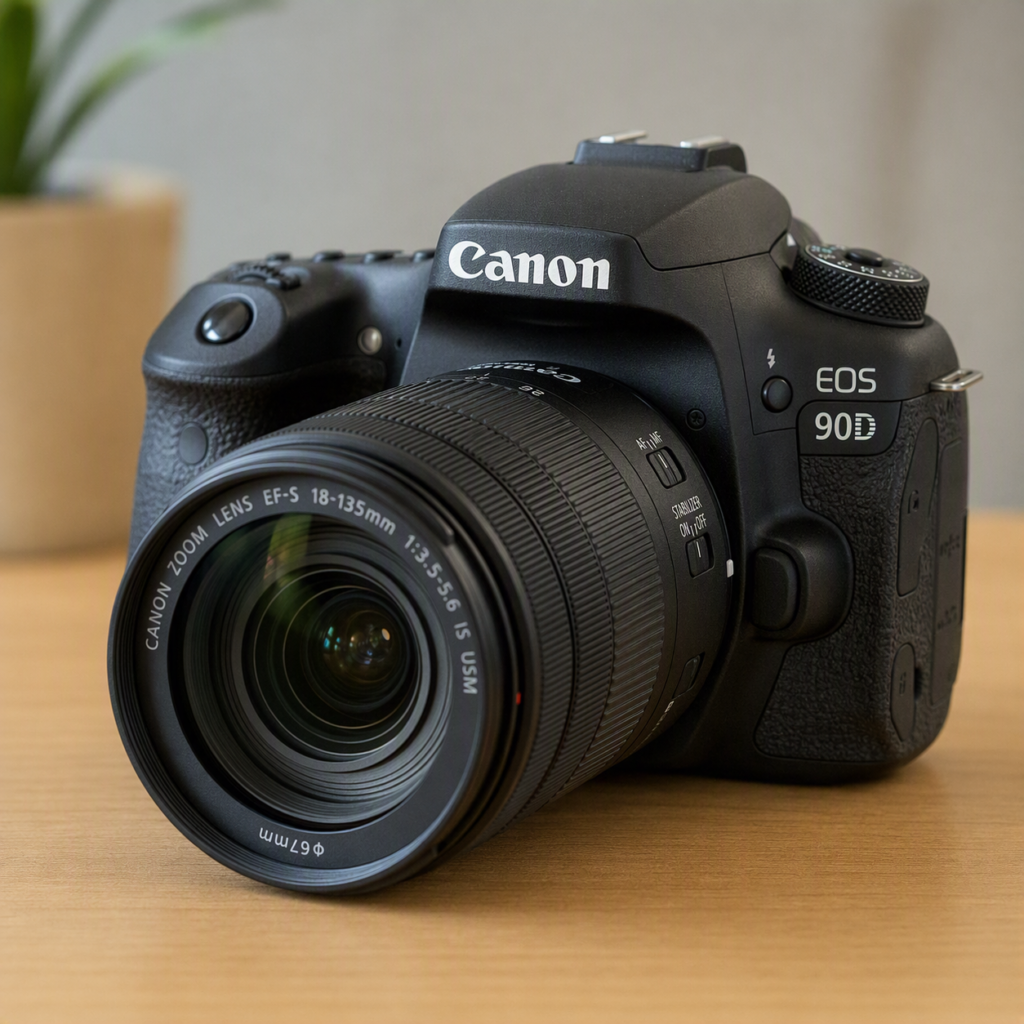
How does system engineer works in camera to improve photoshoot?

A camera systems engineer doesn’t take photos — they build the invisible machinery that makes every photo possible. Their job is to optimize the entire pipeline: sensor → processor → lens → software → output. Here’s how they actually improve a photoshoot.

1. What a camera systems engineer actually doesThey sit at the intersection of:· Hardware — sensor, lens, motors, circuits· Firmware — low-level code running on the camera· Software — ISP algorithms, AI, UI· Physics — optics, light, heat, electronics· User experience — what the photographer needs in the moment

Their goal: make the camera capture the best possible image, every time, under any condition.

2. Improving the sensor (better raw data) The sensor is the foundation. Systems engineers optimize:· Quantum efficiency — how many photons become electrons. Higher = better low-light.·

Full-well capacity — how many electrons a pixel holds. Higher = more dynamic range.· Read noise — random noise added when reading. Lower = cleaner shadows.· Backside illumination (BSI) — flips the sensor so light hits the photodiode directly. More light captured.· Stacked sensors — separate layers for pixels and circuits → faster readout, less rolling shutter.·

Pixel binning — combine 4 pixels into 1 for better low-light (48MP → 12MP clean image).·

Global shutter — read all pixels at once → no skew on fast motion.Result: cleaner, sharper, more detailed raw data before processing even begins.

3. Improving the lens system (better light in) Engineers work with optical designers to:· Tune autofocus motors — linear motors for speed, STM for smooth video· Calibrate focus algorithms — predict where a running subject will be· Optimize IS/IBIS coordination — lens and sensor stabilize together, up to 8 stops· Reduce focus breathing — keep framing stable while focusing· Improve zoom smoothness — cam barrel design for cinematic zooms· Calibrate aperture blades — precise f-stop control, rounded for nice bokehResult: the lens responds instantly and accurately to every command.

4. Improving the ISP (better image processing)This is where most systems engineers spend their time. They tune the image signal processor pipeline:· Demosaicing — smarter interpolation → sharper detail, fewer artifacts· Noise reduction — AI-trained models that remove noise without softening· White balance — accurate color under any light source· Tone mapping — pleasing contrast, preserved highlights and shadows· Sharpening — edge-aware, no halos· Color science — the “look” of the brand (Canon warm, Sony neutral, Fuji film-like)· HDR merging — combine exposures for scenes with extreme contrast· Multi-frame stacking — night mode, handheld high-resResult: the photo looks beautiful straight out of camera.

5. Improving autofocus (better tracking)AF is one of the hardest problems. Engineers optimize:· Phase-detection AF — fast, predictive, works on moving subjects· Eye AF / subject recognition — AI locks onto faces, eyes, animals, vehicles·

Predictive tracking — calculate velocity, anticipate position·

Low-light AF — focus in near-darkness using IR or contrast· Focus limiter — ignore foreground/background distractions·

Custom AF profiles — for sports, portraits, wildlifeResult: the running person stays tack-sharp in every frame.

6. Improving stabilization (better steadiness)Engineers combine:· Lens IS — floating element counters shake· Body IBIS — sensor moves on magnetic suspension· Combined IS — both work together, coordinated frequencies· Electronic IS — processor crops and shifts frames (video)· AI stabilization — predicts movement and smooths it· Horizon lock — keeps frame level even when you tiltResult: handheld video looks like it was on a gimbal.

7. Improving speed and responsivenessA camera must feel instant. Engineers optimize:· Boot time — ready to shoot in milliseconds· Shutter lag — time from press to capture· Buffer depth — how many RAW frames before slowdown· Write speed — to memory card without bottleneck· AF speed — lock-on time· EVF/display latency — what you see is what’s happening now· Thermal management — no throttling during long shootsResult: the camera never gets in the way of the moment.

8. Improving reliability and robustnessIn the field, things go wrong. Engineers build:· Error handling — recover from card errors, lens disconnects· Failsafes — never lose a photo· Weather sealing logic — detect moisture, warn user· Battery management — accurate remaining time, efficient power· Firmware updates — fix bugs, add features post-launch· Redundancy — dual card slots, backup pathsResult: the camera works when it matters most.

9. Improving the user experience (for the photographer)Engineers study how photographers actually shoot:· Custom buttons — assign functions to fingertips· Quick menus — change settings without looking away· Touch AF — tap to focus and shoot· Silent mode — electronic shutter for weddings, wildlife· Intervalometer — time-lapse built in· Focus peaking — manual focus assistance· Zebra stripes — highlight warning· Histogram — live exposure feedbackResult: the camera becomes an extension of the photographer’s intent.

10. The feedback loop: how improvement actually happensSystems engineers don’t guess. They:

1. Measure — lab tests, sensor data, timing logs

2. Simulate — software models of the entire pipeline

3. Prototype — firmware changes, test rigs

4. Test — real-world shoots, controlled conditions

5. Compare — A/B against previous version or competitor

6. Tune — adjust parameters, algorithms, thresholds

7. Ship — firmware update or new model8. Repeat — foreverExample: A sports photographer complains AF misses the ball. Engineers analyze the failure, adjust predictive algorithm, test with running subjects, ship firmware update. Now it tracks better.

11. The core idea in one line A camera systems engineer improves photography by optimizing every layer — sensor, lens, ISP, AF, stabilization, speed, reliability, and UX — so the camera captures the best possible image, instantly, under any condition, without the photographer ever thinking about the technology. Quick analogy· Photographer = driver Camera = car· Systems engineer = the team that designs the engine, transmission, suspension, brakes, and dashboard — so the driver can focus on the road.The best systems engineers are invisible. You never notice their work — you just notice that the photo came out beautifully, every time.

Explore deeper into:·

A) How ISP tuning actually works (parameters, tradeoffs)?

B) How AF algorithms predict motion?·

C) How engineers balance noise vs. detail?·

D) How a specific camera (Sony A1, Canon R5) was engineered?
How to build software application for camera operating system?

Building software for a camera operating system is fundamentally different from building a standard mobile app. You are working at the system level, interacting directly with hardware like image sensors, lenses, and image processors, rather than just using a high-level API.The approach you take depends heavily on whether you are building an app that controls a camera or an OS that runs on a camera.🎯 First, Define Your Target· App on a Camera OS: You are writing software (like a plugin or a feature) that runs on a camera’s existing operating system (e.g., Android on a phone, Linux on a security camera).

The Camera OS Itself: You are building the fundamental software layer that manages the hardware and provides services for other apps. The search results focus primarily on the first scenario—building applications that leverage camera hardware and OS frameworks.🏗️

Understanding the Camera Software Architecture Most modern camera systems (phones, security cameras, embedded devices) use a layered architecture to abstract hardware complexity.

1. Application Layer: The user-facing software (the Camera App, a security monitoring dashboard).

2. Application Framework: Provides high-level services for apps (e.g., Camera Service, MediaRecorder).

3. Native Libraries / HAL: The Hardware Abstraction Layer (HAL) is critical. It translates the generic commands from the framework into specific instructions the camera hardware understands.

4. Kernel & Drivers: The OS kernel (often Linux) and device drivers that directly control the sensor, lens, and image processor.🛠️ How to Build: Three Practical Approaches

1. For Android-Based Cameras (Phones, Tablets) You build an app using the Camera 2 API (or the newer CameraX library).·

How it works: Your app sends Capture Requests to the camera service, specifying parameters like exposure, focus, and aperture. The OS handles the low-level communication with the HAL and driver.· Key Limitation: You are often working within the constraints of the OS’s HAL. Some computational photography tasks might be difficult because the API may not expose full control over the raw image pipeline.2. For Embedded Linux Cameras (Security, Industrial)You build software that runs directly on the device, often using V4L2 (Video4Linux2).·

How it works: You write applications (in C/C++ or Python) that open device files (e.g., /dev/video0) and use ioctl commands to configure the camera and capture frames.·

Key Advantage: This gives you much deeper control. You can write your own algorithms for auto-exposure or autofocus directly in the driver layer, bypassing the generic OS services.· SDK Example: Platforms like Axis cameras offer the ACAP (AXIS Camera Application Platform), a Docker-based SDK that lets you write applications that run on the camera itself for edge computing.

3. For Controlling External Cameras (SDK/App Approach) If you are building an app on a phone or computer to control a separate camera (like a DSLR), you use a Camera SDK.

How it works: You integrate a library that handles the communication protocols (like PTP or MTP) over USB or Wi-Fi.· Practical Tool: CascableCore is an SDK that supports over 250 camera models from Canon, Nikon, Sony, etc., allowing you to write code once that works across many devices.

You would use this to trigger the shutter, change settings, or download files.🧠

Key Considerations for Camera OS Development· Performance & Latency: Camera pipelines are time-sensitive. You must handle data streams efficiently. For example, on Android, you should use a dedicated background thread for frame processing to avoid blocking the UI.· Boot Time: If you are designing a camera OS, quick startup is crucial. Techniques like system suspend/resume (keeping SDRAM powered) can allow the camera to be ready in milliseconds instead of seconds.

Hardware Validation: Since the HAL is a security boundary, you must validate all parameters from the higher layers before passing them to the hardware. This prevents crashes and potential security exploits.In short, building for a camera OS requires you to think like a systems engineer. You need to understand the data pipeline from the photon hitting the sensor to the final image being processed, and then decide at which layer your software will operate.

Explore more specific platform on google search like Android Camera2 or an embedded Linux approach in more detail?

how does games actually works in integrated development environment?

The story from how games are actually built, run, and debugged inside an IDE (Integrated Development Environment).

Let me break it down clearly.

First: what “IDE” means for games

An IDE is software that bundles:

· Code editor (write code)
· Compiler/interpreter (turn code into runnable program)
· Debugger (pause, inspect, fix)
· Build tools (package assets + code)
· Version control (Git integration)

For games, popular IDEs:

· Visual Studio — Unity (C#), Unreal (C++), custom engines
· Rider — Unity, Godot (C#)
· VS Code — Godot, web games, scripting
· Xcode — iOS/macOS games
· Android Studio — Android games

But here’s the key: the IDE doesn’t run the game by itself. It coordinates with an engine and tools.


The full pipeline: how a game actually works in an IDE

  1. Project structure

A game project isn’t just code. It’s:

/Assets        → images, sounds, 3D models, shaders
/Scripts       → your code (C#, C++, GDScript)
/Scenes        → level layouts, object placement
/Prefabs       → reusable objects (enemy, bullet, UI)
/Physics       → materials, collision data
/Build         → compiled output

The IDE edits the code, while the engine editor handles assets and scenes.

  1. Two windows, one workflow

When you make a game, you usually have two apps open at once:

IDE (e.g., Visual Studio) Engine Editor (e.g., Unity)
Write C#/C++ scripts Place objects, drag assets
Debug, set breakpoints Press Play to test
Manage code files Manage scenes, physics

They talk to each other. In Unity, saving a script in the IDE auto-refreshes in the editor.

  1. The build process

When you press Play or Build:

[Source Code] → Compiler → [Assembly/DLL]
[Assets]      → Importer → [Optimized runtime files]
                ↓
         [Engine Runtime]
                ↓
        [Running Game]

· Compiler turns your C#/C++ into machine code or intermediate code.
· Asset pipeline converts PNG → texture format, FBX → mesh, WAV → compressed audio.
· Linker connects your code to the engine’s libraries.
· Engine runtime ties it all together — game loop, rendering, physics, input.

  1. The game loop (what actually runs)

Once running, every frame does this:

while (game running):
    read input        → keyboard, mouse, controller
    update logic      → AI, physics, animations, scripts
    render frame      → draw 3D/2D scene
    play audio        → sound events
    repeat (~60x per second)

Your IDE code hooks into this loop through callbacks:

· Start() — once when object is created
· Update() — every frame
· FixedUpdate() — physics steps
· OnCollision() — when objects hit

  1. Debugging inside the IDE

This is where the IDE shines:

· Breakpoints — pause the game mid-frame, inspect variables
· Watch windows — see live values (health, position, state)
· Call stack — trace which function called what
· Profiler — find slow code (frame time, memory, draw calls)
· Hot reload — change code while the game runs (Unity, Unreal)

Example: game crashes → IDE shows exact file + line → you fix → press Play again.

  1. Engine vs. IDE — who does what

Task IDE Engine
Write code ✅ ❌
Compile ✅ Triggers it
Place objects ❌ ✅
Render scene ❌ ✅
Physics simulation ❌ ✅
Debug logic ✅ Limited
Build final game ✅ Provides runtime

The IDE is the workshop. The engine is the machine. Together they make the game.

  1. Example: Unity + Visual Studio
  2. You create a script PlayerController.cs in Visual Studio.
  3. Unity detects the file, compiles it, attaches it to a GameObject.
  4. You press Play in Unity.
  5. The engine runs your Update() 60× per second.
  6. If there’s an error, Unity shows it — you click → opens Visual Studio at that line.
  7. You set a breakpoint, press Play, game pauses, you inspect player.health.
  8. Fix, save, Unity hot-reloads, game continues.
  9. Exporting the final game

When done, the IDE + engine produce a build:

· Windows/Mac/Linux → .exe / .app / binary
· Mobile → .apk / .ipa
· Console → platform-specific package
· Web → WebGL/HTML5 bundle

The IDE packages code + assets + engine runtime into one distributable.


The core idea in one line

An IDE doesn’t “run” a game — it compiles your code, connects it to the engine, lets you debug live, and packages everything into a playable build. The engine runs the game; the IDE builds and fixes it.


Quick analogy:

· IDE = architect’s desk (drawings, tools, revisions)
· Engine = construction site + building (runs the actual thing)
· Build = the finished house you ship

Explore deeper into:

· A) A specific engine (Unity, Unreal, Godot)?
· B) The compile/build pipeline in detail?
· C) How debugging actually works frame-by-frame?
· D) How to set up a game project in an IDE from scratch?

how does radar light signal works in games software?

I can discuss with optical theory of blends optics, game physics, and software.

Here’s how “radar light signals” work in game software, from the concept down to the code logic. First, a clarification

In games, “radar” usually means one of two very different things:

1. A gameplay radar/minimap — a UI element showing enemy positions (like Call of Duty, Halo, Battlefield).

2. Actual simulated radar/light sensing — raycasting, line-of-sight, or light detection used for AI vision, stealth, or physics (like Metal Gear Solid, Splinter Cell, Alien: Isolation).

Both use light-like signals, but differently. Let me cover both.

1. Gameplay radar (the minimap circle)What it does:· Shows nearby enemies, objectives, or items as blips on a circular display.·

Updates in real time as things move.

How the software works:· World → radar transform: The game takes 3D world coordinates (x, y, z) and flattens them to 2D radar space (x, y).·

Range check: Only objects within a set radius (e.g., 50 meters) are shown.·

Rotation: The radar can be world-locked (north always up) or player-locked (player’s facing always up) — the latter rotates all blips by the negative of the player’s yaw angle.·

Blip rendering: Each detected object draws a small icon or dot on the radar texture/UI.·

Update loop: Runs every frame or every few frames (e.g., 10 Hz) to save performance.

The “light signal” analogy:· The radar is like a sweeping beam — but in software it’s usually not a real sweep. It’s a distance + angle calculation done instantly for all objects.· Some games fake the sweep for style (a rotating line that “reveals” blips as it passes).

Simple pseudocode: for each enemy in world: dx = enemy. x – player.x dy = enemy.y – player.y dist = sqrt(dx*dx + dy*dy) if dist < radarRange: angle = atan2(dy, dx) – player. yaw blipX = cos(angle) * (dist / radarRange) * radarRadius blipY = sin(angle) * (dist / radarRange) * radarRadius drawBlip(blipX, blipY)“`

2. Simulated radar/light sensing (raycasting & line-of-sight)This is where it gets closer to real light physics.

What it does:· Determines whether an AI can “see” the player, or whether a radar pulse reaches a target.

Used for stealth, enemy vision cones, laser tripwires, motion trackers.How the software works:

a) Raycasting· The game fires an invisible ray (a line) from the sensor (enemy eye, radar dish, camera) toward the target.· It checks what the ray hits first using collision detection (ray vs. mesh, ray vs. bounding box).· If the ray hits the target before any wall → line of sight is clear.·

If a wall blocks it → no detection. ray = Ray(origin=sensor.position, direction=target.position – sensor.position)hit = physics.Raycast(ray, maxDistance)if hit.object == target: detected = true“`

b) Vision cones· Enemies have a field of view (e.g., 90°) and a range (e.g., 20m).· The game checks: · Is the target within range? · Is the target within the angle? · Is the line of sight unobstructed?·

All three true → enemy sees player.

c) Light/shadow awareness· Some games (like Splinter Cell, Thief) compute how much light the player is standing in.· The engine samples the lightmap or real-time lighting at the player’s position.· Brighter light → faster detection. Shadow → slower or none.d) Radar pulses (motion trackers)· Alien: Isolation’s motion tracker works like a real radar: · Emits a “pulse” (a timed event in code). · Measures distance and direction to moving objects. · Displays them as a sweeping blip.·

The “signal” is just a distance + angle calculation triggered on a timer, not real radio waves.

3. The physics-inspired layer (if the game simulates real radar)Some military sims and hardcore games simulate actual radar behavior:· Doppler effect: Moving targets shift frequency → game tracks velocity to filter out stationary objects.· Signal strength: Farther targets return weaker signals → blip fades or flickers.· Clutter/noise: Terrain and objects create false returns → game adds random noise or ghost blips.· Pulse timing: Time between emit and return = distance (d = c × t/2). Games can mimic this for realism.

Software approximation:“`distance = (timeNow – pulseEmitTime) * speedOfLight / 2 // faked, not real csignalStrength = 1 / (distance * distance) // inverse square lawif signalStrength > noiseThreshold: showBlip()

4. How light itself is simulated in game engines Since you asked about “light signal,” here’s the core:· Ray tracing: Fires rays from the camera or light source, bounces them off surfaces, computes color/reflection. Physically accurate but expensive.·

Rasterization: Fakes light with shaders — computes brightness per pixel based on light direction, distance, and surface normal.·

Lightmaps: Pre-baked light data stored in textures (static scenes).· Global illumination: Simulates light bouncing off walls (e.g., Unreal’s Lumen, Unity’s Enlighten).For radar/vision, games rarely simulate real photons — they use raycasts and math as a fast stand-in.—The core idea in one lineIn game software, a “radar light signal” is really a math problem: distance + angle + line-of-sight check + signal strength — updated every frame — not actual light or radio waves.

Quick comparison table: Feature Gameplay radar Simulated radar/LOSPurpose Show enemies on UI AI detection, stealthMethod Distance + angle math Raycasting + cone checksPhysics realism Low Medium–highCost Very cheap Moderate Example CoD minimap Splinter Cell visionWant me to go deeper into raycasting code, AI vision systems, or i can discuss about more on

how a specific game (like Alien: Isolation) implements its tracker?

Can light be lonely — traveling forever without ever stopping?

light travels in open space and it’s make object visible to see with naked eye. The light travels with high speed and velocity reach maximum so when it’s hit wall of anything it’s capacity make it visible to see us of anything we around us like car , house, tv and bike and etc. Light contain photon particles and it’s contain packet of energy in it so I can give you more through knowledge like The physics answer: light never stops

From a photon’s perspective, the journey is strange:

· A photon doesn’t experience time. At the speed of light, time dilation is infinite — time “stops.” So from the photon’s own frame, it’s emitted and absorbed in the same instant, no matter how many billions of years pass for us.
· A photon doesn’t age or decay (in a vacuum). It travels until something absorbs it — a leaf, an eye, a grain of dust, a planet.
· It can’t slow down or rest. Light in a vacuum must travel at c. It has no “off” switch.

So in a literal sense — no, it can’t be lonely, because loneliness requires time to feel it, and the photon has no time at all.

The poetic answer: yes, profoundly

But if we let light be a character in the story:

· It is born in violence — fusion in a star’s core — and spends its whole existence fleeing.
· It crosses emptiness for millennia with nothing to touch.
· When it finally reaches something — your eye, a flower, a window — it ends. It is absorbed. It becomes warmth, or color, or a memory.
· So light’s “life” is: a long, silent journey toward a single moment of contact — and then it’s gone.

That’s either the loneliest thing imaginable, or the most romantic.

The twist

Here’s the part that gives me chills:

Every photon that has ever touched your skin traveled across the universe to do it. Some left their star before Earth existed. They crossed void, dust, and time — not to be seen, but because that’s what light does.

And the moment they reached you, they stopped being travelers and became part of you — a signal, a warmth, a color in your eye.

So maybe light isn’t lonely at all. Maybe it’s the one thing in the universe that is always arriving — always moving toward something, never truly alone, because the whole point of light is to be received.

In one line:

Light cannot be lonely — it has no time to feel it. But it is always, endlessly, on its way to someone.

Blog on ar lighting and vr is coming soon.

How camera technology function with light?

Here’s how camera technology functions with light — from the physics of light itself to how each camera component manipulates it:

1. The nature of light (what the camera is capturing)Light is electromagnetic radiation that travels as waves and also behaves as particles called photons. Key properties that matter to cameras:· Intensity (brightness) — how many photons arrive → determines exposure· Wavelength — determines color (≈400nm violet → ≈700nm red)· Direction — where rays come from → determines focus and perspective· Polarization — the orientation of light waves → used in some filtersA camera’s whole job is to measure intensity, organize direction, and separate wavelength — then record that information.

2. The lens: bending light by refraction· Light refracts (bends) when passing between materials of different density (air → glass).· A convex lens bends incoming rays so they converge to a focal point.· Focal length (e.g., 50mm) determines how strongly light bends: · Short focal length → wide view · Long focal length → zoomed-in view· Multiple lens elements correct distortions like chromatic aberration (different colors focusing at different points).

3. Aperture: controlling light quantity· The aperture is an adjustable iris. Its size is measured in f-stops (f/1.8, f/8, etc.).· Lower f-number = bigger opening = more light (and shallower depth of field).· Higher f-number = smaller opening = less light (and deeper depth of field).· Each full f-stop halves or doubles the light reaching the sensor.

4. Shutter: controlling light duration· The shutter is a timed gate. Shutter speed = how long light is allowed in.· 1/1000s → very little light, freezes motion· 1/30s → more light, may blur motion· Like aperture, each step doubles or halves light exposure.Aperture + shutter speed together = the exposure (total light energy hitting the sensor).

5. ISO: amplifying the light signal· ISO doesn’t change how much light enters — it amplifies the sensor’s signal.· Low ISO (100) → clean image, needs more light· High ISO (6400) → works in dim light, but adds noise· Think of it as the gain knob on the light signal.The exposure triangle: Aperture × Shutter × ISO — adjusting one affects the others.

6. The sensor: converting photons to electronsThis is where light becomes data:· Each photosite (pixel) is a tiny photodiode made of silicon.· When a photon hits silicon, it knocks loose an electron (photoelectric effect).· More photons → more electrons → stronger signal.· The charge is accumulated during exposure, then read out as a voltage.· An ADC converts that voltage into a digital number (e.g., 0–4095 for 12-bit).Color separation:· Silicon only detects brightness, not color.· A Bayer filter (red/green/blue mosaic) sits over the sensor, so each pixel sees only one color.· The processor interpolates (demosaics) to reconstruct full color per pixel.

7. How the camera handles different light levels· Bright light: fast shutter, small aperture, low ISO· Low light: slow shutter, wide aperture, high ISO (or add light/flash)· High contrast: sensor’s dynamic range limits how much bright-to-dark it can capture at once — HDR modes combine multiple exposures.

8. Autofocus & metering (light-based decisions)· Autofocus: uses phase detection or contrast detection to find where light rays converge sharpest.· Metering: measures light intensity across the scene to pick exposure settings.· White balance: measures color temperature of light (warm tungsten vs cool daylight) and corrects it.The core idea in one line:A camera is a light-measuring machine: the lens bends light, aperture and shutter control how much and how long, the sensor converts photons into electrons, and the processor turns those electrons into an image — all while ISO, autofocus, and metering manage the light signal at every step.

Explore more deeper into any piece — like sensor physics, dynamic range, or how low-light performance works?

how does camera captures photo?

Here’s how a camera actually captures a photo, step by

Step:1. You press the shutter buttonThis triggers a sequence of events. In a digital camera, it’s all electronic; in a film camera, it’s mechanical.

2. The shutter opensThe shutter is like a curtain in front of the sensor/film. It opens for a precise amount of time (the shutter speed) — maybe 1/1000th of a second in bright light, or several seconds in the dark.

3. Light passes through the lensLight from the scene enters through the lens, which bends (refracts) the rays so they converge into a sharp image. The aperture (a hole inside the lens) controls how much light gets through.

4. Light hits the sensor (digital) or film (analog)Digital sensor:· The sensor is a grid of millions of tiny light-sensitive spots called photosites (or pixels).· Each photosite converts incoming photons into electrons — more light = more electrons. Most sensors have a Bayer filter on top: a mosaic of red, green, and blue filters, so each photosite only records one color. Green is most common because human eyes are most sensitive to green.· The sensor also has microlenses on each pixel to gather light more efficiently.Film:· Light hits silver halide crystals on the film, causing a chemical change.· This creates a “latent image” that becomes visible after developing.

5. The sensor reads out the signalOnce the shutter closes, the camera:· Measures the charge (electrons) at each photosite.· Converts that analog charge into a digital number using an analog-to-digital converter (ADC).· The result: raw pixel values (brightness per color channel).

6. Image processingThe camera’s processor turns raw data into a viewable image:· Demosaicing — fills in missing colors by interpolating from neighboring pixels (since each pixel only saw one color).· White balance — corrects color casts so whites look white.· Noise reduction — smooths out random sensor noise.· Sharpening & tone mapping — adjusts contrast, brightness, and sharpness.· Compression — saves as JPEG (lossy, smaller) or RAW/TIFF (uncompressed, more editing flexibility).

7. Saved to memoryThe final image is written to a memory card (SD, CFexpress, etc.) as a file.The whole chain in one line:Light → lens focuses it → aperture & shutter control it → sensor converts photons to electrons → ADC turns electrons into numbers → processor turns numbers into an image → saved to memory.Want me to go deeper on any part — like how autofocus works, how ISO fits in, or how RAW vs JPEG differs?

how does games software work?

Game software works by creating a real-time interactive simulation that responds to player input, renders graphics, plays audio, and manages game state—all within milliseconds. Here’s the complete system:

1. The Core Loop — The Heart of Every GameEvery game, from Pong to Cyberpunk 2077, runs on a continuous loop: while (game is running) { ProcessInput() // Read keyboard, mouse, controller Update() // Move objects, check collisions, run AI Render() // Draw everything to screen PlayAudio() // Play sounds and music} This loop runs 30–120 times per second (FPS). Everything else in game software exists to make this loop faster, smoother, and more capable.

2. The Game Engine — The Foundation A game engine is a collection of software systems that handle common tasks so developers don’t build from scratch:Engine Language Best For Notable GamesUnreal Engine C++ / Blueprints AAA, photorealistic Fortnite, Gears of WarUnity C# Indie, mobile, AR/VR Among Us, Pokémon GoGodot GDScript / C++ Open-source, 2D/3D Brotato, Cassette BeastsGameMaker GML 2D indie Undertale, Hotline MiamiCustom engines C++ Specific needs EA Frostbite, Rockstar RAGEWhat engines provide:· Rendering — draws 2D/3D graphics· Physics — simulates gravity, collisions· Audio — plays sound effects and music· Input — reads keyboard, mouse, controller· Networking — multiplayer support· Scripting — game logic· Asset pipeline — imports models, textures, sounds

3. Rendering — How Graphics AppearRendering is the most computationally expensive part: 3D Models → Transform → Lighting → Rasterize → Pixels on Screen Stage What HappensModel loading Load 3D meshes from diskTransformation Position objects in 3D spaceCamera Calculate view from player’s perspectiveLighting Calculate light on surfacesRasterization Convert 3D to 2D pixelsShading Apply textures, colors, effectsPost-processing Bloom, blur, color gradingOutput Send to monitorGPU role: The Graphics Processing Unit handles millions of calculations in parallel—essential for real-time rendering.

4. Physics — How Objects BehavePhysics engines simulate real-world motion:Physics System What It DoesRigid body Solid objects, collisionsSoft body Cloth, hair, deformable objectsFluid Water, smoke, fireParticle Sparks, dust, explosionsRagdoll Character death animationsVehicle Car, bike, plane physicsCollision detection: Every frame, the engine checks if objects overlap: if (objectA.bounds overlaps objectB.bounds) { resolveCollision(objectA, objectB)}

5. Game Logic — How the Game BehavesGame logic is the rules of the game:System What It ManagesState machine Menu, playing, paused, game overAI Enemy behavior, pathfindingQuest system Missions, objectivesInventory Items, weapons, upgradesScoring Points, levels, progressionDialogue NPC conversationsSave/load Persist player progressExample — Enemy AI: if (player is visible) { if (distance < attackRange) { attack() } else { moveToward(player) }} else { patrol()}

6. Audio — How Games SoundGame audio is layered and dynamic:Audio Type PurposeSound effects Footsteps, gunshots, UI clicksMusic Background, adaptiveAmbient Wind, crowd, environmentVoice Dialogue, narrationSpatial audio 3D positioned soundMiddleware: Tools like FMOD and Wwise handle complex audio mixing, effects, and adaptive music.

7. Input — How Players ControlInput systems read and translate player actions:Input Device How It WorksKeyboard Key press → actionMouse Position + click → aim/shootController Analog sticks, buttons, triggersTouch Tap, swipe, pinchMotion Gyroscope, accelerometerVR controllers 6DoF position + rotationVoice Microphone → commandsInput mapping: Games abstract input so the same action works on any device: “Jump” → Spacebar (PC) / A button (Xbox) / X button (PlayStation)

8. Networking — How Multiplayer WorksMultiplayer games synchronize state across players:Model How It Works ExamplePeer-to-peer Players connect directly Among UsClient-server Central server authoritative FortniteDedicated server Game company hosts World of WarcraftListen server One player hosts MinecraftKey challenges:· Latency — delay between players· Lag compensation — predicting where players are· Cheating prevention — server authority· State sync — keeping all players consistent9. Asset Pipeline — How Content Gets InGame assets are created in external tools and imported:Asset Type Created In Imported As3D models Blender, Maya, 3ds Max FBX, OBJ, GLTFTextures Photoshop, Substance PNG, TGA, DDSAudio Pro Tools, Audacity WAV, OGG, MP3Animation Blender, MotionBuilder FBX, BVHLevels Unity, Unreal Editor Scene filesScripts IDE (VS Code, Rider) C#, C++, GDScript10. The Full Game Software Stack“`┌─────────────────────────────────────┐│ GAME CODE │ ← Game logic, AI, quests├─────────────────────────────────────┤│ GAME ENGINE │ ← Rendering, physics, audio├─────────────────────────────────────┤│ MIDDLEWARE / PLUGINS │ ← FMOD, PhysX, Havok├─────────────────────────────────────┤│ PLATFORM SDK / APIs │ ← DirectX, Vulkan, Metal├─────────────────────────────────────┤│ OPERATING SYSTEM │ ← Windows, Android, iOS├─────────────────────────────────────┤│ HARDWARE │ ← CPU, GPU, RAM, Storage└─────────────────────────────────────┘“`

11. Real-Time Performance — Why It’s HardGames must run in real-time—unlike movies, which are pre-rendered:Challenge Target WhyFrame rate 60–120 FPS Smooth motionFrame time 8–16ms No stutterLatency <20ms Responsive inputMemory Limited Fit in RAM/VRAMThermals Cool No throttlingEvery millisecond counts. A game that takes 20ms per frame runs at 50 FPS—noticeably laggy.

12. Game Software CategoriesType How It Works ExamplesSingle-player Local, no network Zelda, Elden RingMultiplayer Networked Call of Duty, FortniteMMO Massive, persistent World of WarcraftMobile Touch, casual Candy Crush, PUBG MobileVR Immersive, 6DoF Half-Life: AlyxAR Real world + digital Pokémon GoCloud Streamed from server Xbox Cloud GamingBrowser Runs in browser Slither.io

13. The Development Pipeline“`Idea → Design → Prototype → Production → Testing → Release → Live Ops Stage What HappensDesign Game design document, mechanicsPrototype Playable demo, core loopProduction Art, code, audio, levelsTesting QA, bug fixing, balanceRelease Launch on platformsLive Ops Updates, DLC, events

14. Key Programming ConceptsConcept What It DoesGame loop Runs the gameEntity-component system Organizes game objectsState machine Manages game statesPathfinding AI navigation (A*) Collision detection Object interactionObject pooling Reuse objects for performanceLOD Level of detail for distant objectsCulling Don’t render what’s not seenBatching Draw similar objects together

15. The Future of Game SoftwareTrend What It MeansAI-generated content Procedural worlds, NPCsCloud gaming No local hardwareRay tracing Realistic lighting Machine learning Smarter AI, upscalingMetaverse Persistent shared worldsNeural rendering AI-generated framesQuantum computing Physics simulations🔑 The Core IdeaGame software works by:

1. Looping — input → update → render → repeat

2. Simulating — physics, AI, game rules

3. Rendering — drawing 2D/3D graphics

4. Sounding — playing audio

5. Networking — syncing multiplayer

6. Managing — assets, memory, performance

7. Responding — in real-time, every frameA game is a real-time simulation that responds to you.It’s not just software—it’s a living system that thinks, reacts, and evolves 60 times per second.

Explore deeper into any part—like how game engines render 3D graphics, how multiplayer networking works, or how AI in games makes decisions?

What are the key APIs and SDKs for building AR — ARKit, ARCore, OpenXR, WebXR?

The key APIs and SDKs for building AR each serve a distinct purpose, from platform-specific development to cross-platform standards and web-based accessibility.🍎

ARKit (Apple) ARKit is Apple’s native framework for building AR experiences on iOS, iPadOS, and visionOS . It provides the essential building blocks like motion tracking (6DoF), scene understanding (plane detection, image/object tracking), and people occlusion.

You typically pair ARKit with RealityKit for high-performance 3D rendering or SceneKit for simpler scenes .🤖

ARCore (Google)ARCore is Google’s cross-platform SDK for Android and iOS . Its core capabilities mirror ARKit: motion tracking, environmental understanding (detecting horizontal/vertical surfaces), and light estimation . A standout feature is Geospatial API, which uses Google’s Street View data for precise outdoor location anchoring, and Cloud Anchors for persistent, shared AR experiences .🌐

OpenXR (Khronos Group) OpenXR is not a specific AR SDK but an open, royalty-free standard for accessing VR/AR devices and runtimes .

Its goal is to let developers write code once and run it across many headsets (like Meta Quest, HoloLens, and SteamVR) without rewriting for each platform . It abstracts device features like display, tracking, input, and haptics into a unified API .🕸️

WebXR (W3C) WebXR is a web standard that brings AR/VR to browsers .

It lets you access immersive devices directly from a web page without installing an app.

On Android, it uses ARCore behind the scenes; on visionOS, it uses Apple’s ARKit . It’s ideal for accessible, link-shareable AR but currently supports fewer advanced features (like plane detection) compared to native SDKs .💡

How to Choose· ARKit for deep, native integration on Apple devices.· ARCore for broad reach across Android and iOS.· OpenXR when you need your app to run on many different headsets.· WebXR for instant, browser-based experiences.

Find and explore a specific use case, like building for headsets or web-based AR?

How does ar works and get shapes in real world? What is the reality in it and it’s features and function and system and software and products related to it?

Augmented Reality (AR) works by blending virtual objects with the real world in real-time, creating an illusion that digital content exists in your physical space.

The technology relies on a system that continuously tracks the environment and your position to anchor virtual shapes to real-world coordinates.🧠

How AR Places Virtual Shapes in Reality

The core challenge is making a virtual object appear “fixed” to a real-world location. Here is the technical pipeline that makes this possible:·

Sensing the Environment: The system uses cameras and sensors (like LiDAR) to capture depth data and images of the surroundings .

This data builds a 3D “point cloud” or mesh of your room, detecting surfaces like tables and walls .· Simultaneous Localization and Mapping (SLAM): As the device moves, SLAM algorithms perform two tasks simultaneously: they build a map of the environment and calculate the device’s precise position (pose) within that map .

This creates a consistent coordinate system for virtual objects .·

6 Degrees of Freedom (6DoF) Tracking: Systems track your position and orientation with 6DoF (x, y, z position plus pitch, yaw, roll rotation) .

This allows virtual objects to stay anchored in place as you move around them.· Anchoring and Occlusion: Once a surface is mapped, virtual objects are anchored to it. For true realism, occlusion is used: if a real object is between you and the virtual object, the system hides the virtual part using a depth map . This creates the illusion that the virtual object is truly behind the real one.🕶️ What is the “Reality” in AR?

The “reality” in AR is a blended, interactive experience where virtual elements are contextually aware of the physical world. It is not simply an overlay; the system understands the geometry of the space . This understanding enables features like:·

Spatial Audio: Sounds from virtual objects appear to come from their specific location.·

Physical Interaction: You can walk around a virtual object as if it were physically there.·

Contextual Information: AR can display information relevant to what you are looking at (e.g., a mechanic seeing a diagram overlaid on an aircraft part) .⚙️ Features, Functions, and the Software System

The software architecture that enables this is typically layered:· Data Layer: This includes a World Knowledge component, which is a digital representation of the real space used for localization and analysis . Interactive Contents are the virtual 3D models and their behaviors .·

Vision Engine: Processes camera input to detect features, planes, and objects, providing the positional data for the SLAM system .·

Rendering Engine: Uses a Graphical Processing Unit (GPU) to draw the virtual content. It calculates how the virtual object should look from your current perspective, handling lighting and shadows to make it look realistic .📱

Products and PlatformsThe industry is shifting toward lightweight glasses, with 84.6% of XR shipments being glasses in Q2 2026 .

Major platforms include:·

Meta: Offers the Ray-Ban Meta line (audio and camera glasses) and a new lightweight Meta VR Glasses (launching 2027) that offloads computing to a pocket puck . Google: Android XR platform provides Jetpack Compose Glimmer for building AR interfaces on AI glasses .

Apple: Vision Pro is a high-end mixed reality headset for immersive experiences. In summary, AR works by fusing sensor data to build a map, tracking your movement within it, and rendering virtual objects that are anchored to real-world surfaces with realistic occlusion.

EXPLORE MORE IN DEPTH LIKE

How someone’s would like you to explore the specific differences between AR, VR, and Mixed Reality (MR)?